All services
Commercial Service·Yorkshire & beyond

Business WiFi & Network Installation

Business WiFi installation for offices, warehouses, manufacturing sites, shops, cafés and restaurants across Yorkshire. WiFi that reaches every corner of the premises, staff and guest networks kept apart, and card machines, CCTV and IoT devices on networks of their own. Underneath it is proper business kit: managed switching, VLANs and a business‑grade firewall, set up properly and supported afterwards.

Geek Fix install relevant to Business WiFi & Network Installation

/ When to call us

Signs your business needs this service

  • Moving to a new office or refurbishing your existing one
  • You've outgrown the "consumer router under the desk" stage
  • Staff complain about WiFi, conference calls dropping, slow shared drives
  • You need separate networks for staff, guests, payment terminals and CCTV
  • PoE devices (VoIP phones, cameras, door entry, badge readers) need proper switching
  • Cyber Essentials, PCI‑DSS or GDPR compliance audits looming
  • Multi‑site business needing site‑to‑site VPN

Only after the cabling, without the switching and firewall on top? we install network cabling on its own too.

/ What you get

What's included

  • Network design proposal — cabling, switching, WiFi, firewall layout, IP plan
  • Structured cabling installed by an OCNA‑certified engineer
  • TP‑Link Omada or Ubiquiti UniFi managed switching (PoE+ where required)
  • Business‑grade firewall configuration — stateful inspection, IDS/IPS, VPN, content filtering
  • VLAN segmentation — Staff / Guest / IoT / VoIP / CCTV / Payment isolated properly
  • Business WiFi with seamless roaming across the office floor
  • Site‑to‑site VPN setup between branches or to a home office
  • Conference room cabling: HDMI over Cat, dual‑monitor feeds, AV integration
  • Cyber Essentials‑ready configuration (your assessor will be happy)
  • Cloud dashboard handover — see live network status from your phone
  • Network monitoring for Omada controller installs, currently at no extra charge

/ After the install

Your network keeps reporting to us after we leave.

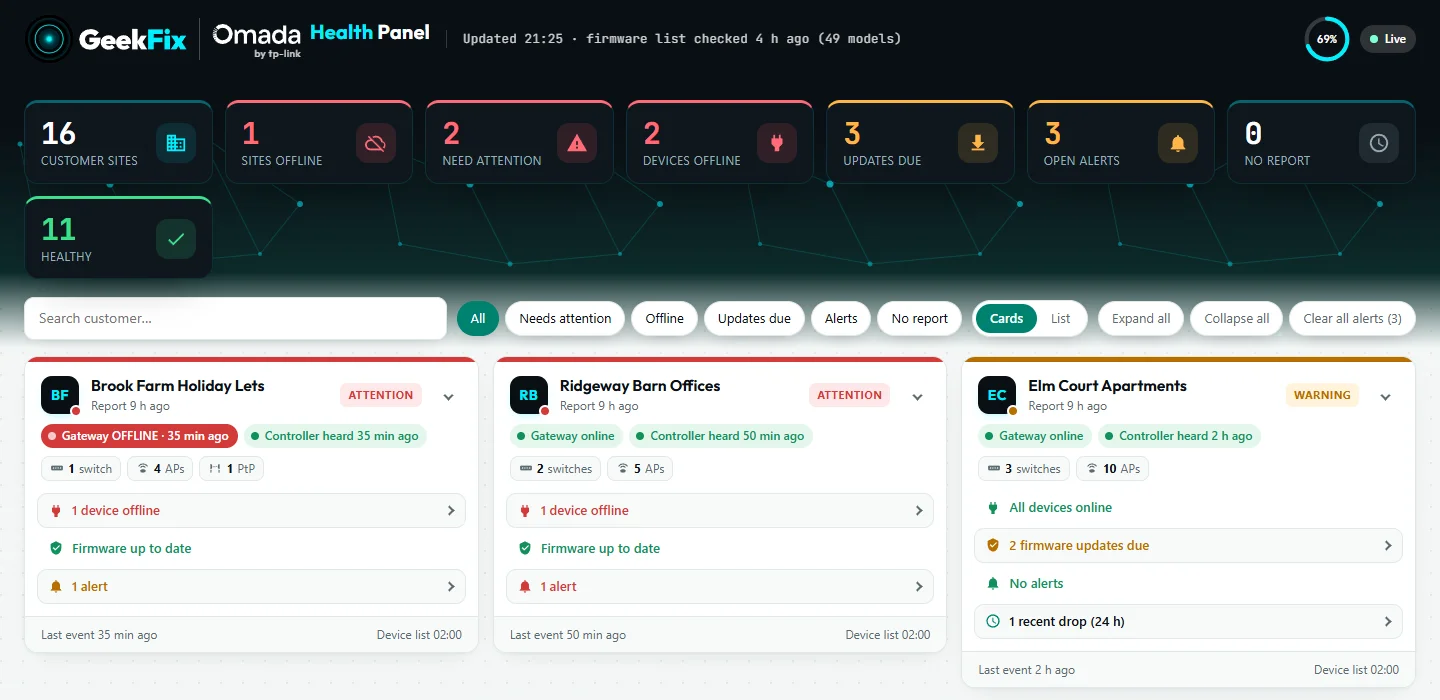
When we install your network with a TP-Link Omada controller, we connect it to the Geek Fix Health Panel, our own monitoring dashboard. Your Omada equipment then reports its status to us automatically: device problems, alerts and configuration changes as they happen, and a full device check every night.

Problems show on that dashboard, which we check. When something drops, we can see which device, since when, and what Omada reported, so the diagnosis starts from facts rather than guesswork.

Currently included at no extra charge on Omada controller installs

The Geek Fix Health Panel dashboard with demonstration data: summary tiles for sites offline, devices offline, updates due and open alerts, above cards for three example customer sites
Our monitoring dashboard, shown with demonstration data. Customer names and device details are illustrative.
  • Device problems as they happen

    An access point, switch or Omada router dropping offline shows on our dashboard as soon as your controller reports it.

  • Alerts with the detail to act on

    Faults such as a broadband link going down, or two devices clashing on one address, arrive with what we need to start diagnosing.

  • A full check every night

    Each night your controller sends us a complete list of its equipment, with model, firmware version, status and uptime.

  • Configuration changes logged

    If a setting on your network changes, we can see what changed and when, so nothing is a mystery when we next look.

  • Firmware updates flagged

    The dashboard also shows us when TP-Link releases a firmware update for your equipment.

  • Only we can see it

    Sign-in to the dashboard is limited to Geek Fix, and the monitoring data is stored encrypted on servers in the EU.

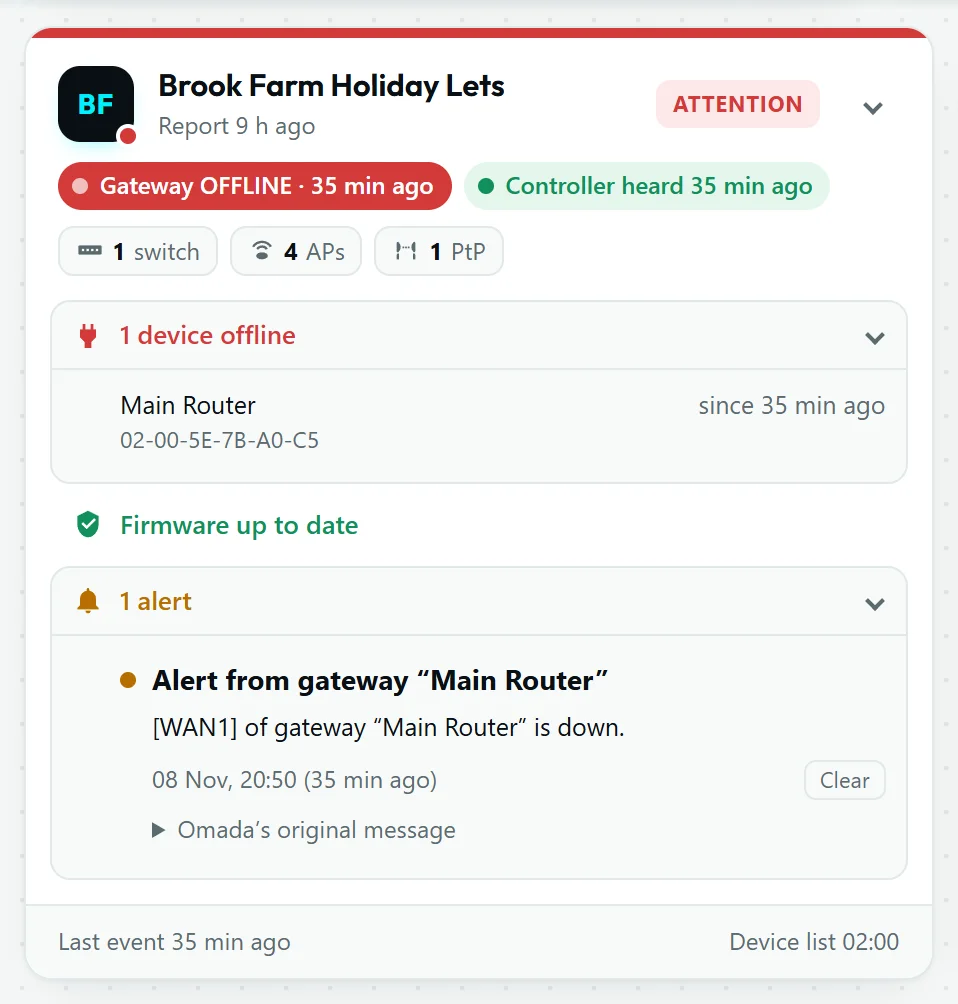
One example site card from the dashboard, with demonstration data: the router is offline, and the alert below it reports that the broadband link went down 35 minutes earlier
One site opened up: which device dropped, when, and what Omada reported. Demonstration data.

Private by design

Monitoring watches the equipment, not the people using it. It does not record who uses your network or what they do: no browsing, no traffic, no log of devices coming and going. Where a fault involves one of your own devices, such as two devices trying to use the same address, the alert can include that device's hardware address, which we use only to fix the fault. Alerts are deleted automatically after 90 days.

Good to know

  • It relies on your site's internet connection. If your broadband or the controller's power goes down, your equipment cannot report until it is back. The broadband itself is your internet provider's responsibility.
  • It covers the TP-Link Omada equipment we installed, not your internet provider's router or other equipment.
  • It does not send you notifications and comes with no guaranteed response time. Support beyond your warranty is charged at our standard rates.
  • You can ask us to stop at any time, and we will delete the monitoring data we hold about your equipment.

/ Our Process

How a typical business network job runs.

  1. STEP 01

    Discovery

    We meet onsite to understand staff, devices, applications and growth plans.

  2. STEP 02

    Consultation & design

    Cable route survey, equipment specification, drawn‑up network diagram.

  3. STEP 03

    Quote

    Itemised proposal with hardware, cabling and labour broken out. Valid 7 days.

  4. STEP 04

    Fit‑out

    We coordinate with electricians and builders during refurb. Out‑of‑hours installs available.

  5. STEP 05

    Commissioning

    Configuration, testing, documentation. You get a network diagram and credential vault.

  6. STEP 06

    Aftercare

    12‑month workmanship warranty, plus network monitoring for Omada controller installs.

/ Investment

Starting from

Every job is different, so final pricing is confirmed after a site consultation. The figures below are typical starting points to help you plan.

Quoted

after site consultation

Full small‑office network design & install

From

£250 + VAT

per AP location

Business WiFi access point install

From

£140 + VAT

per run

Structured cabling, priced per run

/ Recent jobs

Real work, close to home.

Northallerton

Restaurant network installed in a day in Northallerton

For Farmhouse's new restaurant in Northallerton, the electrician ran the cables and we installed the rest of the business network: the cabinet, patching, switches, router and WiFi access points, all in one day.

Leeds

Restaurant WiFi and network rewire in Leeds

BT full fibre had arrived at Farmhouse in Leeds, but the BT mesh WiFi couldn't get a signal out of the basement. We ran new cables to the data sockets behind the bar that led back to the cabinet, rewired the cabinet and fitted WiFi access points across the restaurant ceiling.

Leeds

Apartment building WiFi in Leeds, ready for opening day

A new apartment building in Leeds city centre had been let down, with 48 hours to go before its first guests arrived. They called us in at the last minute. We installed a TP-Link Omada network through the building, with each apartment on its own access point and kept separate from the others, plus WiFi for staff, all ready before the doors opened.

Minskip

Wireless bridge between two farm buildings near Minskip

At a farm café near Minskip, we linked two buildings about 100m apart with a point-to-point wireless bridge, fitted a ceiling access point and housed the network kit in a locked wall cabinet.

/ Questions

Frequently asked.

Do I need a managed switch or will an unmanaged switch do?+

If you want VLANs, PoE budgeting, link aggregation or any kind of visibility into who's doing what on your network — you need managed. Unmanaged is fine for a 3‑person office with no compliance needs. Most growing businesses outgrow unmanaged within a year.

What's a VLAN and why do I need one?+

A VLAN is a virtually separated network on the same physical cabling. It means your guest WiFi can't see your accounting server. Your CCTV can't be hacked from your point‑of‑sale system. It's a fundamental security boundary and pretty much non‑negotiable for any business handling customer data.

Can you help us pass Cyber Essentials?+

Yes. We deploy networks with the Cyber Essentials technical controls in mind — segmentation, firewall posture, patch management hooks, MFA gates on admin interfaces. Your assessor will tick everything off without raising eyebrows.

Can you work alongside our electricians during a fit‑out?+

Absolutely. Most of our business work is during refurbs and new builds. We coordinate with the electrical contractor on conduit routing, power‑to‑data trunking, ceiling cassettes — whatever the build needs. We can also work out of hours / weekends to minimise disruption.

What support do we get after the install?+

Every install carries our 12‑month workmanship warranty. If we install your network with a TP‑Link Omada controller, we can also connect it to our network monitoring service, currently at no extra charge: your Omada equipment reports device problems, alerts and configuration changes as they happen, plus a full device check every night, and problems show on our monitoring dashboard, which we check. Remote and on‑site support beyond that is charged at our standard rates, set out in our Terms & Conditions.

We're a small office (3–5 staff) — is this overkill?+

Not really. A 5‑person professional services office handling client data has the same security baseline as a 50‑person one. We scale the kit and the bill, not the standards.
/ Areas we cover

Business Network across North Yorkshire and beyond.

We're based in Knaresborough, so most of our work is close to home:

We also regularly work in Ripon, Skipton, Thirsk, Northallerton and the Lake District. Further afield? Get in touch and we'll tell you straight whether we can help.

/ Get in Touch

Book a consultation or request a quote.

Tell us about the property, the problem or the plan. We’ll come back with a clear scope and a written quote — usually within 24 hours.

Call us

01423 209018

Email

info@geekfix.uk

Service area

Knaresborough · North Yorkshire · Yorkshire & beyond

1‑HOUR CALLBACK

Send this form during working hours and we’ll call you back within 60 minutes.

HOURS

Mon – Fri · 9:00 – 18:00

Out‑of‑hours emergency?

Every engineer's Enhanced DBS checked — your home stays your home.

By submitting you agree to be contacted about your enquiry. We never share your details.

You'll get a confirmation email shortly.