Plenty of electricians run data cable beautifully. Those never seem to be the jobs we get called to.
That is the honest starting point for this post, and it is worth saying first, because the title sounds like the start of a rant. It isn't one. Electricians are good at electrics, plenty of them are good at data too, and we would much rather the cable in your walls was right first time than come and fix it later.
But we fix it later a lot. Over the years, a pattern has built up in the jobs we get called to, and the same handful of problems turn up again and again. Almost all of them start in the same place: network cabling sold as an add-on to the electrical work, rather than planned as a job in its own right.
So this is a post about what to check, written for anyone having building work done, a rewire, an extension or a new build. If you know what good looks like, you can ask for it, whoever is holding the drill.
Why the electrician is the one running the cable
It makes complete sense, and it is worth being fair about it.
The electrician is already on site. The floors are up and the walls are open, which is the only time cable can be run cleanly without lifting anything that has been finished. They are running cable into every room anyway. So the conversation goes something like: "We're already running the power, do you want us to run data while we're at it?" One trade, one invoice, no extra people in the house. For a customer juggling a build, that is an easy yes.
The trouble is what happens next. On a busy job, data cable can end up being treated like another circuit: run in the same routes as the power, joined with whatever connectors are in the van, finished on a socket at each end and switched on. If a laptop gets a connection, the job looks done.
And we are rarely involved at the beginning. By the time someone calls us, the walls are plastered, the decorating is finished and something does not work. That is the most expensive moment there is to find out how a cable was put in.
What we get called in to find
None of these are made up for effect, and none of them name anybody. They are the real jobs behind the photographs, and between them they cover almost everything that goes wrong.
Data cable joined with electrical or telephone connectors
This is the one we see most, and it is the one that surprises people most, because the connection usually works, just badly.
Network cable is four twisted pairs of wire, and the twist is not decoration. It is what lets the cable carry fast data without the pairs interfering with each other. Joining a data cable means keeping those twists right up to the termination, on a connector made for it. Untwist a few centimetres and squeeze the ends into something designed for mains or telephone wiring, and you have a cable that might connect, slowly, until it doesn't.
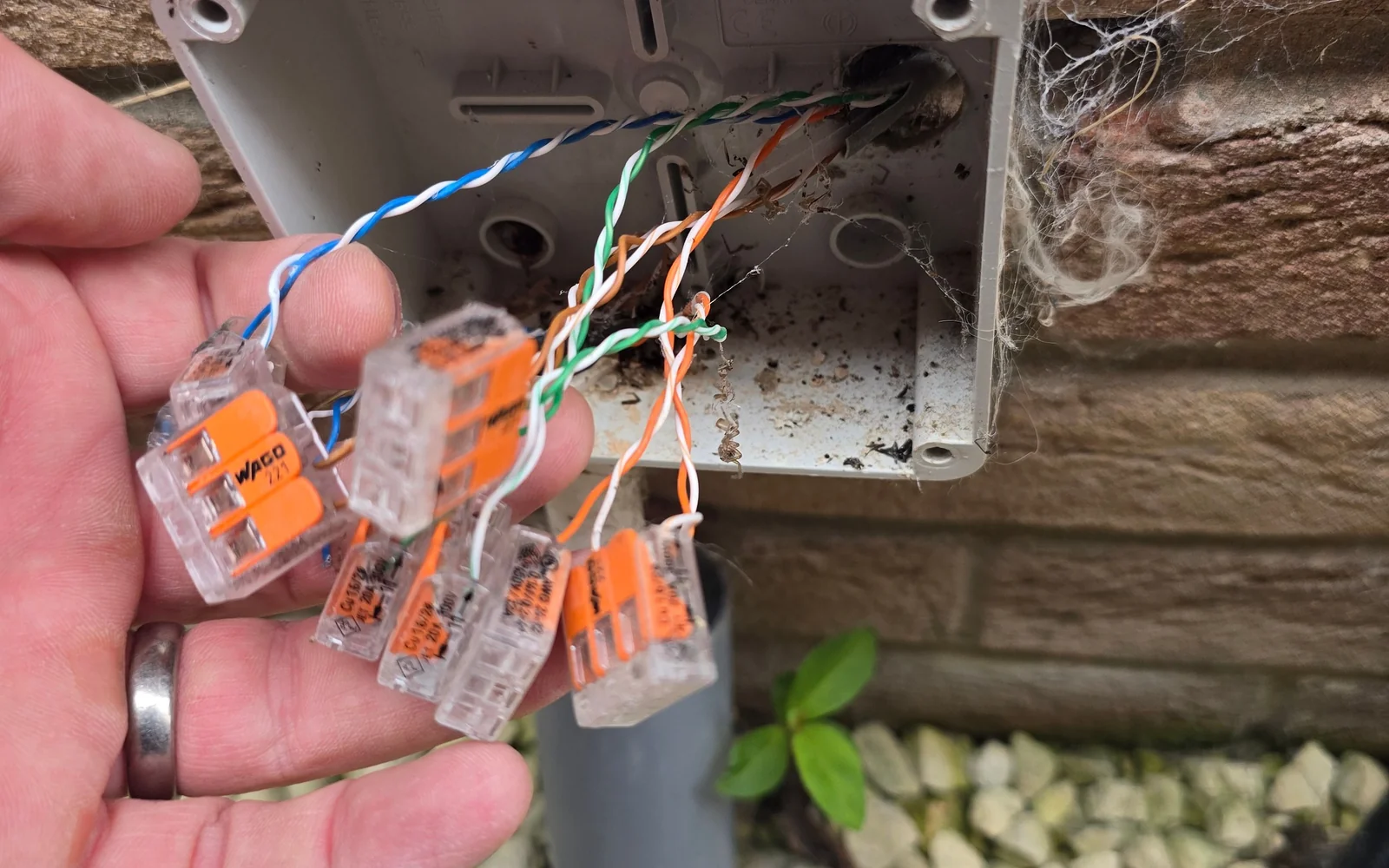
The photograph at the top of this post is a new build near Wetherby, sold with a "Cat6 upgrade". The upgrade was joined in an outside box with lever connectors from an electrical wholesaler. We have found the same thing done with gel-filled connectors made for telephone wire, on cable with CAT 6 printed right there on the sheath, and with choc-block terminal strips, both inside a wall socket and outside in a garden:
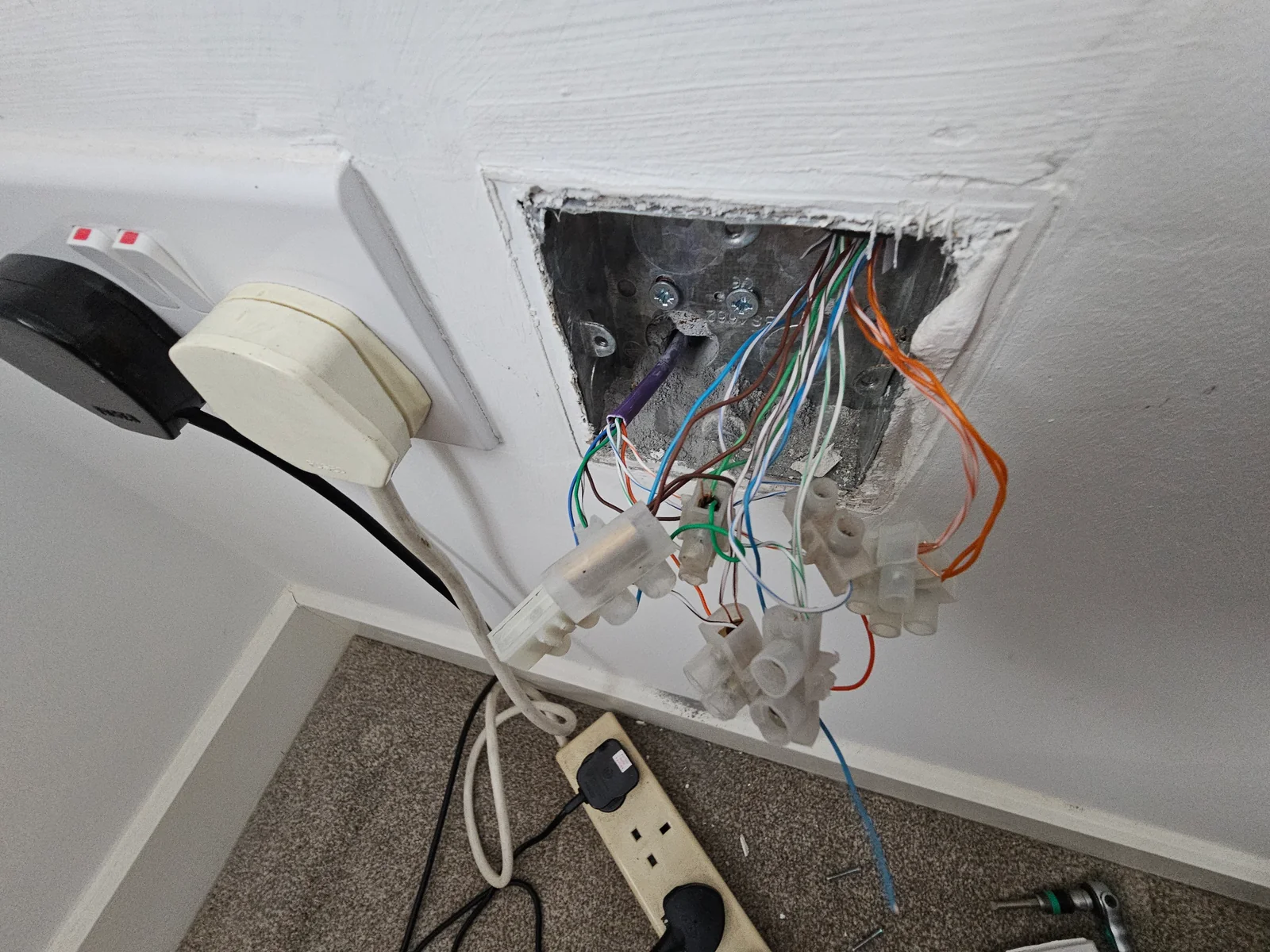
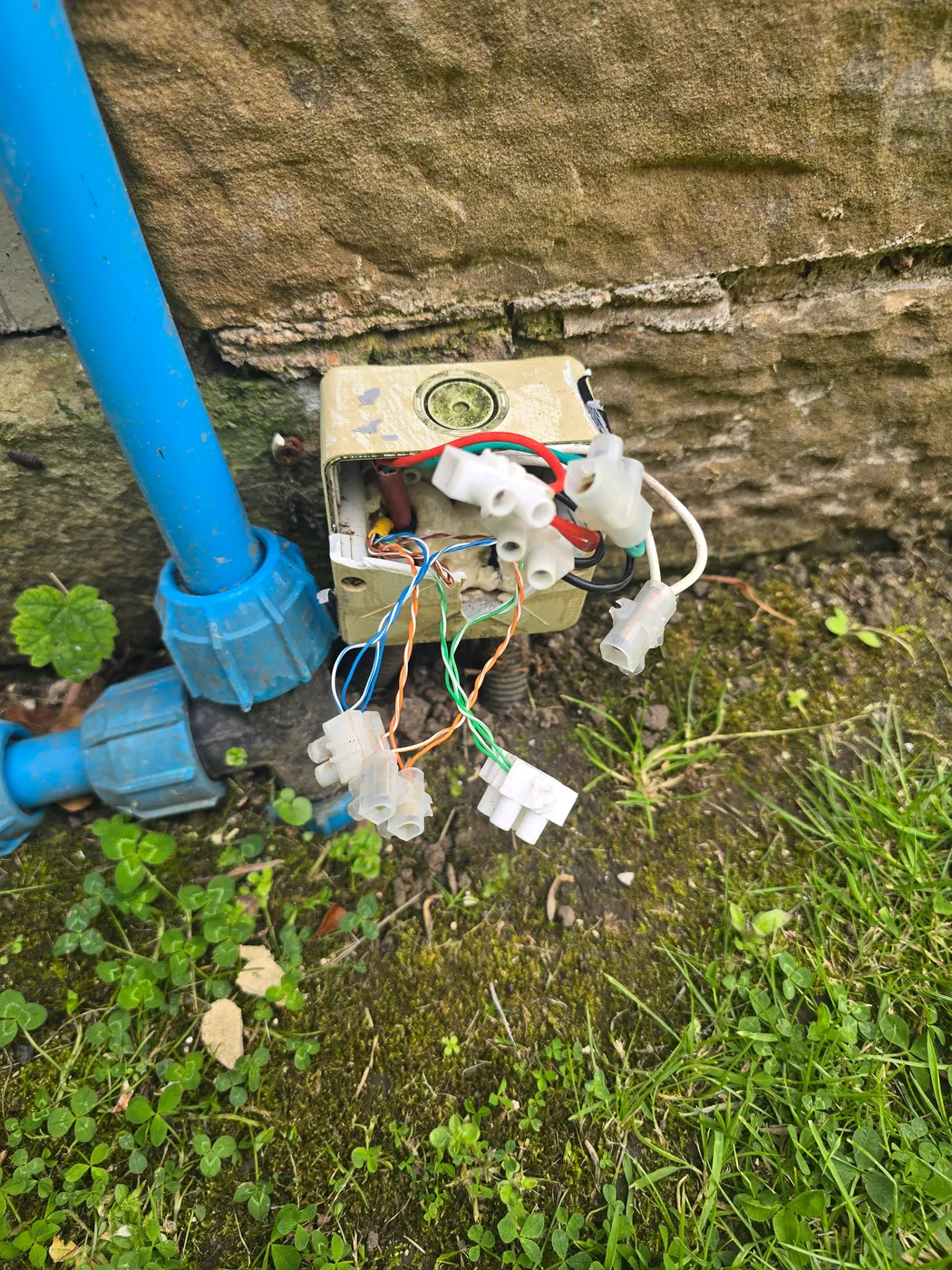
A cable that has to be joined should be joined with a proper data coupler or, better, brought to a socket or patch panel. And one that is outside needs to stay sealed.
Sockets that are wired, but not properly
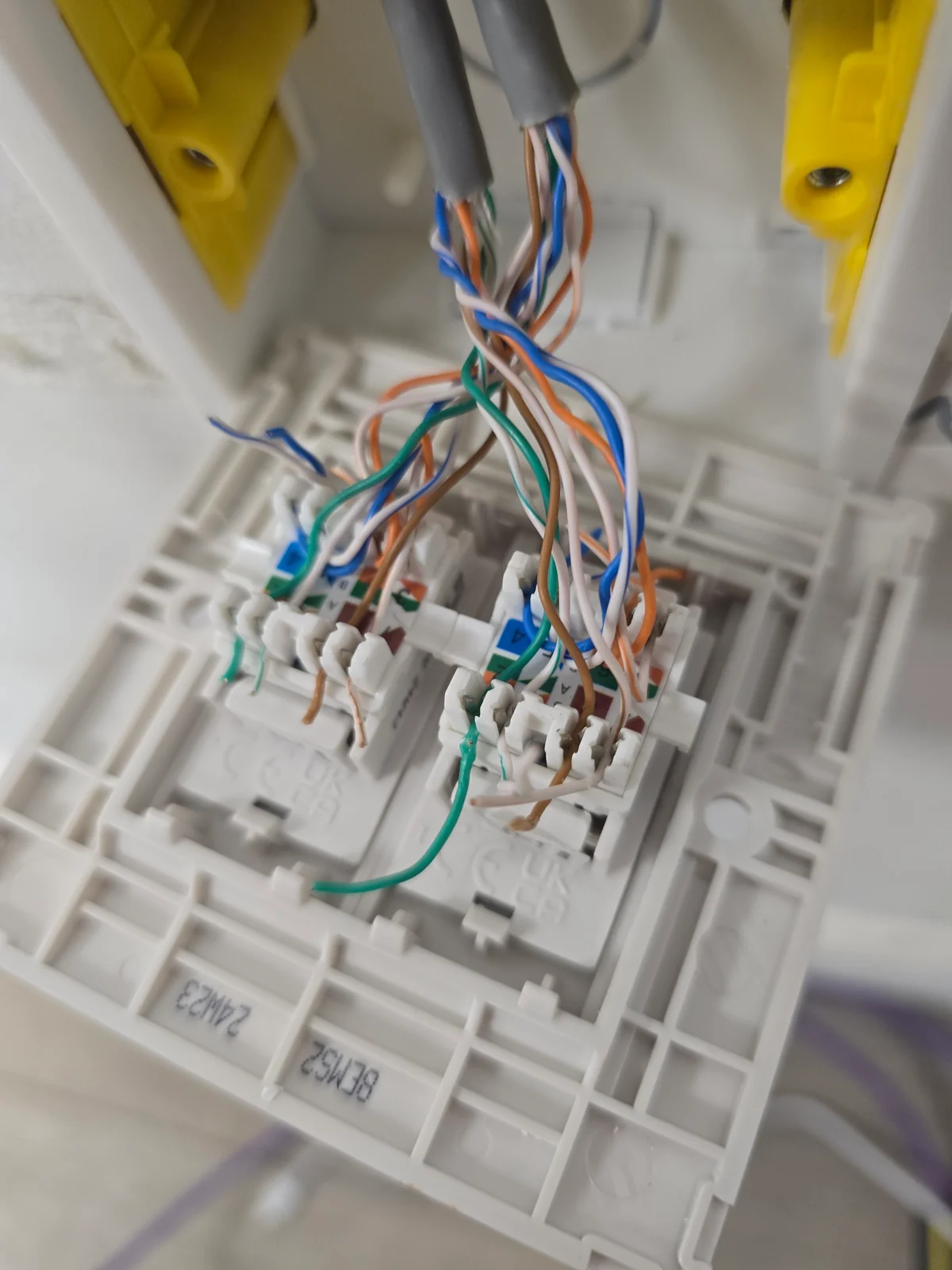
The most common fault of all is the least dramatic: a data socket where the wires have gone in, but not well. Pairs untwisted too far back, a wire not seated fully in its slot, two wires swapped, or a mix of the two colour codes at either end.
The giveaway is a connection that works but is stuck at 100 Mbps, or drops out when someone shuts a door. Fast network connections use all four pairs. The older, slower standard only needs two. So a socket with one bad pair will often still connect, quietly, at a tenth of the speed you paid for.
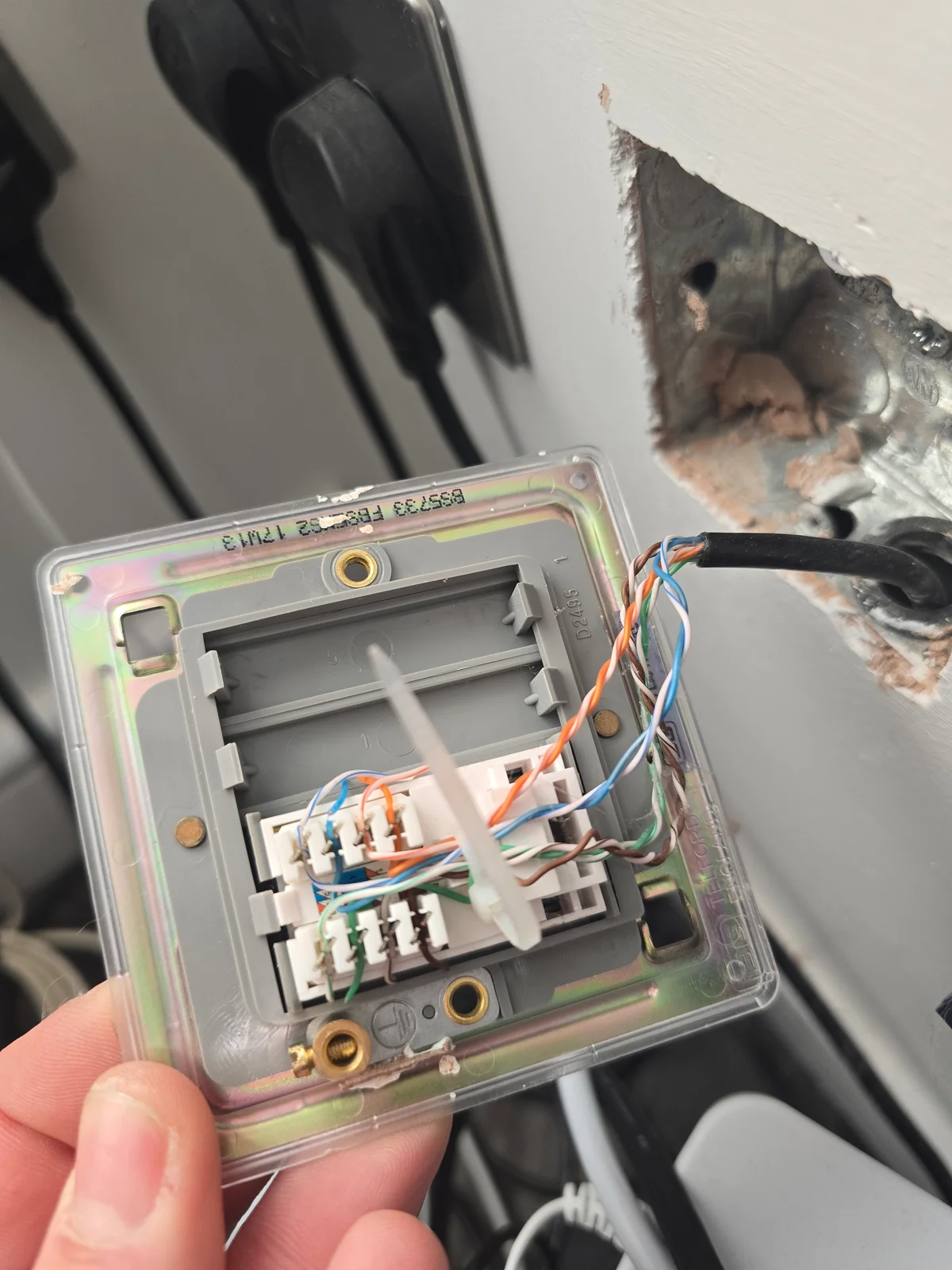
That one had been looked at by two electricians and a self-described network engineer before we were called. The fault was at the back of the socket the whole time. Another, below, was a socket the original electrician had come back to three times without curing it:
Plugs crimped straight onto installation cable
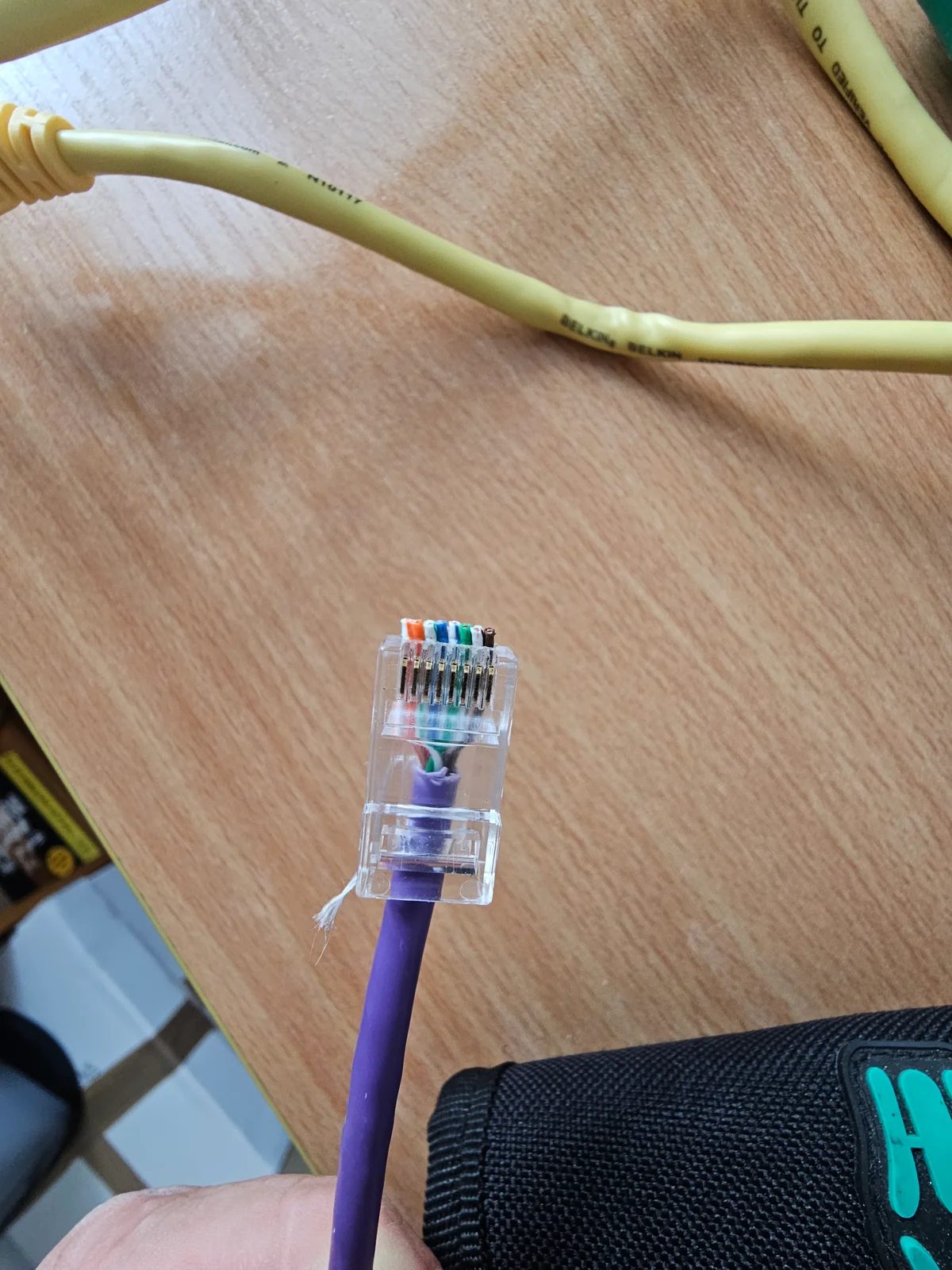
The cable that goes in walls is normally solid-core: each wire is one solid copper conductor, which is what makes it suitable for terminating on a socket or patch panel. The flexible leads you plug into a laptop are stranded. The two are not interchangeable at the ends. Crimp an ordinary plug onto solid-core cable and the pins can sit on the wire rather than biting into it, which works on the day and fails when someone moves the cable.
The right way is to terminate the installation cable on a socket or a patch panel, then use a proper patch lead from there. Where a plug genuinely has to go on the end of solid cable, it needs to be a plug designed for solid conductors, with the outer sheath gripped inside it.
Look at the tip of the plug, too. A push-through plug lets the wires pass right out of the front, and the ends are meant to be cut off flush once it is crimped. Left untrimmed, the excess pokes out past the end of the plug and stops it going fully into a socket. It is a telltale sign of a low-quality installation.
The wrong cable, from the start
Two problems we cannot show in a photo, because you cannot see them without reading the cable or testing it:
- CCA cable. Copper-clad aluminium is aluminium wire with a thin copper coating. It is cheaper than solid copper, and it is often printed with a category it does not really meet. It is more brittle, it has higher resistance, and it is a poor choice for running power to access points and cameras over the cable. Always ask for solid copper, by name.
- Cat5e where Cat6 was quoted. It happens. Cat5e is a perfectly capable cable for a lot of homes, but if you paid for Cat6, you should have Cat6. The category is printed on the sheath every metre or so. It takes thirty seconds to check before it disappears behind plaster.
Data run tight alongside the mains
Network cable and mains cable are not supposed to be bundled together. The UK wiring regulations, BS 7671, keep data and other extra-low-voltage circuits apart from mains circuits: they must be segregated, or every conductor must be insulated for the mains voltage. The data cabling standards add separation distances, for a practical reason as well as a safety one: a data cable strapped to a power cable for a long run picks up interference, and that shows up as slow speeds and dropped connections.
We have found data cable buried in a lawn alongside the mains, joined with choc blocks at ground level. It "worked". It should never have been done.
No plan, no labels, no record
The last problem is the biggest one, and it is not about any single cable. It is the absence of a plan.
A network has to be designed around where the WiFi access points need to go, where the router lives, where the TV, the office and the cameras are, and where everything comes back to. Cable that is run "one to each bedroom, two to the lounge" often ends up in the wrong places for WiFi and comes back to a cupboard with no space, no ventilation and no power.
Then there are the labels. A cupboard full of identical white cables with nothing written on them turns every future fault into tracing work. We wrote a whole post on why a tidy cabinet is about the next engineer, not the photograph, and this is the same point at the other end of the job.
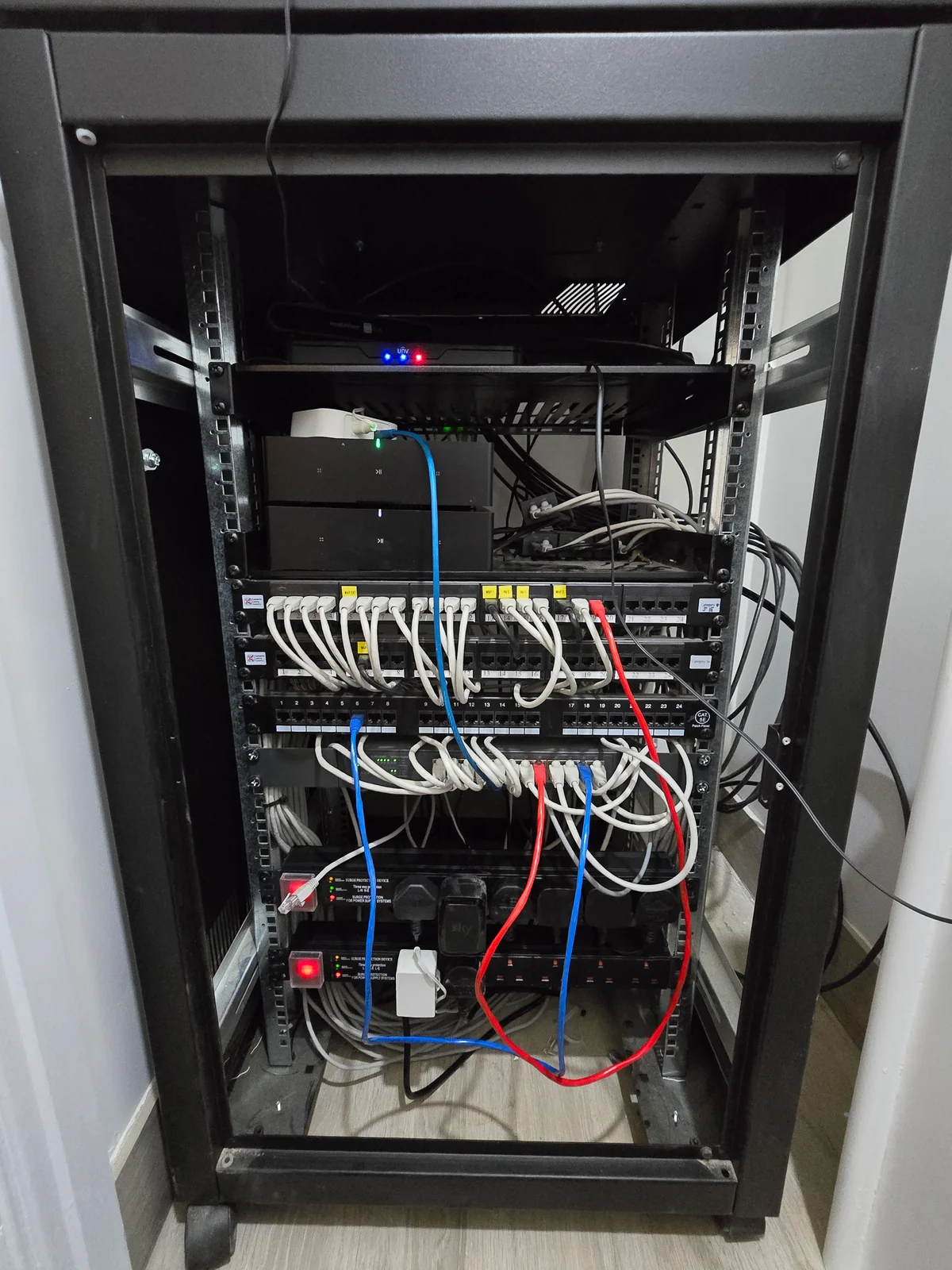
And then there is the job that sums all of this up: a short-let development days from opening, where the WiFi had been left to the electrical contractor. The cable was in. The network wasn't. We were in on the Monday.
From the field — Alex
We do not touch electrics. We are not electricians. We leave electrical work to electricians, just like electricians should leave networking to us. They're already on site and they're already running power cables, so they offer to run the data cables while they're at it, and we're rarely involved at the beginning. Plenty of sparkys run data cable beautifully. Those never seem to be the jobs we get called to.
What we do differently
Nothing on this list is clever. It is just the job done as a job in its own right.
- Plan it first. Where do the access points go? Where does every cable come back to? We work that out before a single cable is pulled, and the top-down approach for upstairs coverage usually decides where the ceiling points go.
- Solid copper cable, of the category you were quoted. Always.
- No joins in the run. Where a join cannot be avoided, it is on a proper data coupler, not a power or telephone connector.
- Terminated properly. On data sockets and a patch panel, with the twists kept right up to the terminals.
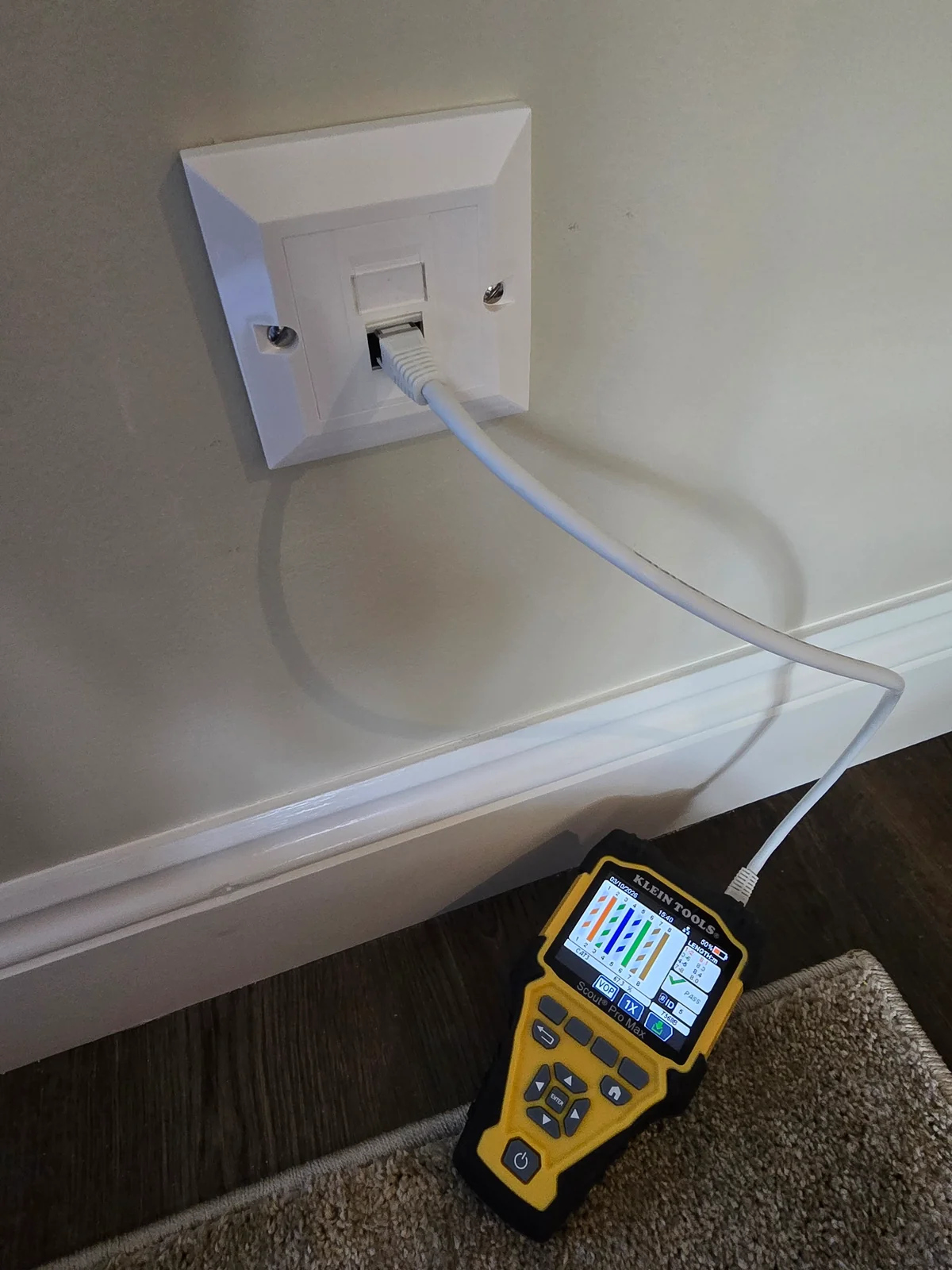
- Tested end to end. Every run, every time, with a dedicated cable tester that checks each wire is connected, in the right order and the right length.
- Labelled at both ends, with a record of which port goes where.
- The house put back together. Faceplates on, holes filled, nothing left hanging.
The cable is only part of the network
Most of this post has been about cable, because that is where electricians and network engineers overlap. But cabling is one aspect of a network, not the whole of it. In a home that is easy to miss. In a business, setting the hardware up correctly matters just as much as the cable it plugs into.
A network that stays up is the cabling coming together with the equipment on the end of it, set up by someone with networking knowledge rather than wiring knowledge:
- IP addressing. Every device on the network needs an address. Planning them properly is what lets the tills, card readers, printers, VoIP phones and CCTV still be found and managed next month.
- VLANs. These split one physical network into separate ones: staff, guests, cameras, phones. The guest WiFi cannot see the office PCs, and the camera traffic stays off the office network.
- Switches. Managed switches set up at layer 2, the level where devices on the network talk to each other: which port belongs to which VLAN, and which ports power the access points and cameras over the cable.
- Routers. The way in and out of the building, and the rules for how traffic moves between those separate networks.
Get any one of those wrong and a beautifully cabled building still has a network that drops out, slows down, or lets the wrong devices see each other. Get them all right, together, and you have a rock-solid network.
| Electrician | Network engineer | |
|---|---|---|
| Cabling | Can be neat; joins, terminations and testing vary | Data-only parts, terminated, tested end to end and labelled |
| Router and switches | Not their trade | Chosen, installed and set up as one system |
| IP addressing | Not their trade | Planned, so every device can be found and managed |
| VLANs | Not their trade | Staff, guests, cameras and phones kept apart |
| WiFi | Not their trade | Access points placed and set up for the building |
| Mains work | Yes, that's their job | None. We never touch electrics |
| Best at | Power, lighting, safety | The network and everything on it |
Neither trade is "bad". They are good at different things, and on a well-run job each sticks to its own.
Both, at the right time
The best jobs we do are the ones where we are in at the start, working alongside the electrician rather than after them. They do the power, including the sockets for the cabinet and any access points that need it. We do the data, in the same open walls, at the same time. Nobody steps on anybody's toes, and the cable goes exactly where the network needs it.
If that is not possible, and the electrician is doing the data, that is fine too. Just ask these questions before the walls close:
- What cable are you using? Solid copper, and which category? Ask to see the box.
- Will there be any joins in the runs? If yes, what are they joined with?
- What will the cables be terminated on? Data sockets and a patch panel, or plugs on the ends?
- How will each run be tested? "We plug a laptop in" is not testing.
- Will both ends be labelled, and will I get a record of what goes where?
- Where does everything come back to? And is there power and ventilation there?
- Has anyone planned where the WiFi access points go? If not, someone should, before the cable is run.
A good electrician will have straightforward answers to all seven. If the answers are vague, that tells you something too.
Where we come in
Running new cable, or putting right cable that is already in, is our network cabling work, and it is usually the first step of a home WiFi or business network job. If you have cable in the walls and something is not right, we test what you have first. Most of the time the cable can be kept and the problem is at the ends.
We cover Yorkshire and the Lake District from our base in Knaresborough, most weeks in Harrogate, York, Leeds and Windermere, with regular work across the Dales, Wetherby, Ripon and out into the Lakes.
If you are planning building work, the cheapest time to call us is before the electrician's first fix. A free phone call is enough to tell whether the job needs us at all, and if it does, where the cables should go before anybody picks up a drill.
And if you are an electrician reading this: we would genuinely rather work with you than after you. Give us a ring.